Documents in. Structured, verified data out.

Extraction agents pull entities, clauses, and fields from unstructured documents. Every extraction traces back to the source passage.

Solution

Documents in, structured data out

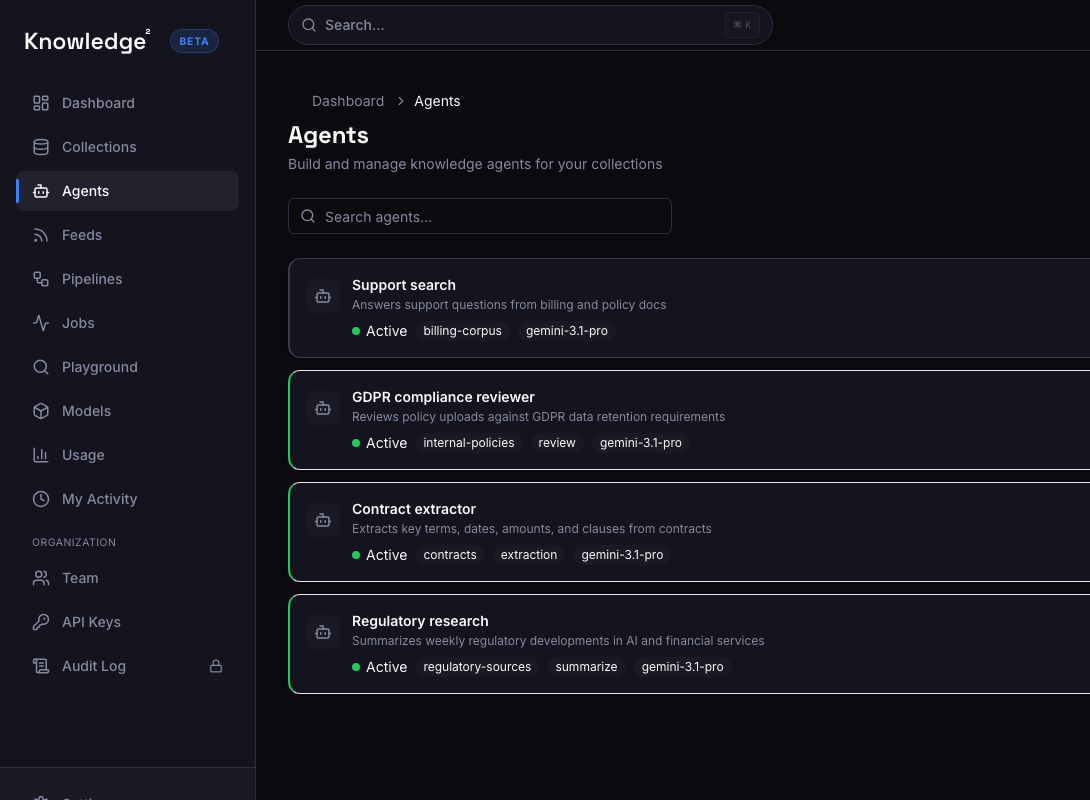
  • Classification agents auto-tag documents by type, topic, or taxonomy.
  • Extraction agents pull entities, clauses, and structured fields.
  • Every extraction cites the source passage it came from.

What automated classification and extraction looks like

Manual tagging and data entry do not scale. Extraction agents do the same work on a schedule, with citations, and at a fraction of the cost.

01

Classification that works at scale

  • Auto-tag documents by type, department, intent, or custom taxonomy
  • Classification agents run on schedule against new content in your collections
  • Outputs drive downstream workflows: routing, alerting, or further extraction
Multiple agents with classification and extraction task-type badges
02

Extraction that cites its sources

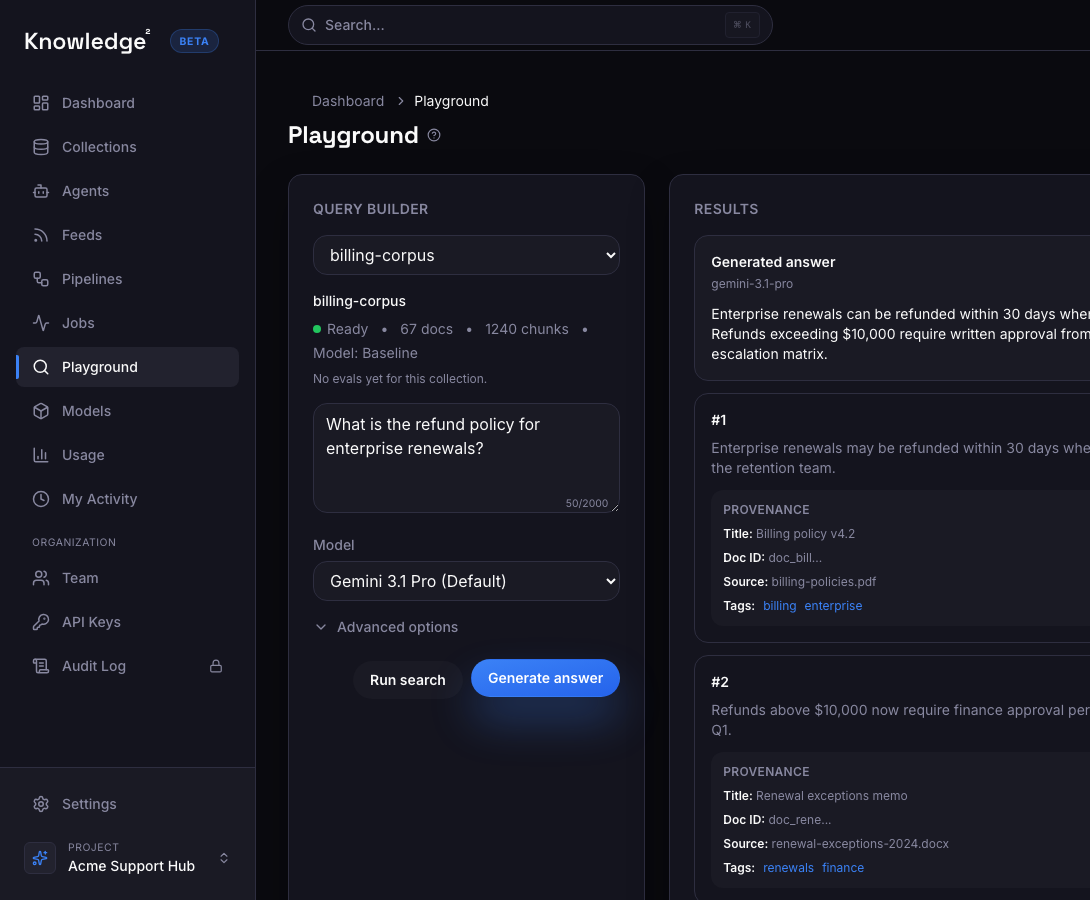
  • Pull named entities, key clauses, dates, amounts, and structured fields from unstructured documents
  • Every extracted field includes a citation to the source passage
  • Blueprints for common patterns: contracts, invoices, medical records, regulatory filings
Extracted data with cited source passages for verification
03

From documents to structured data

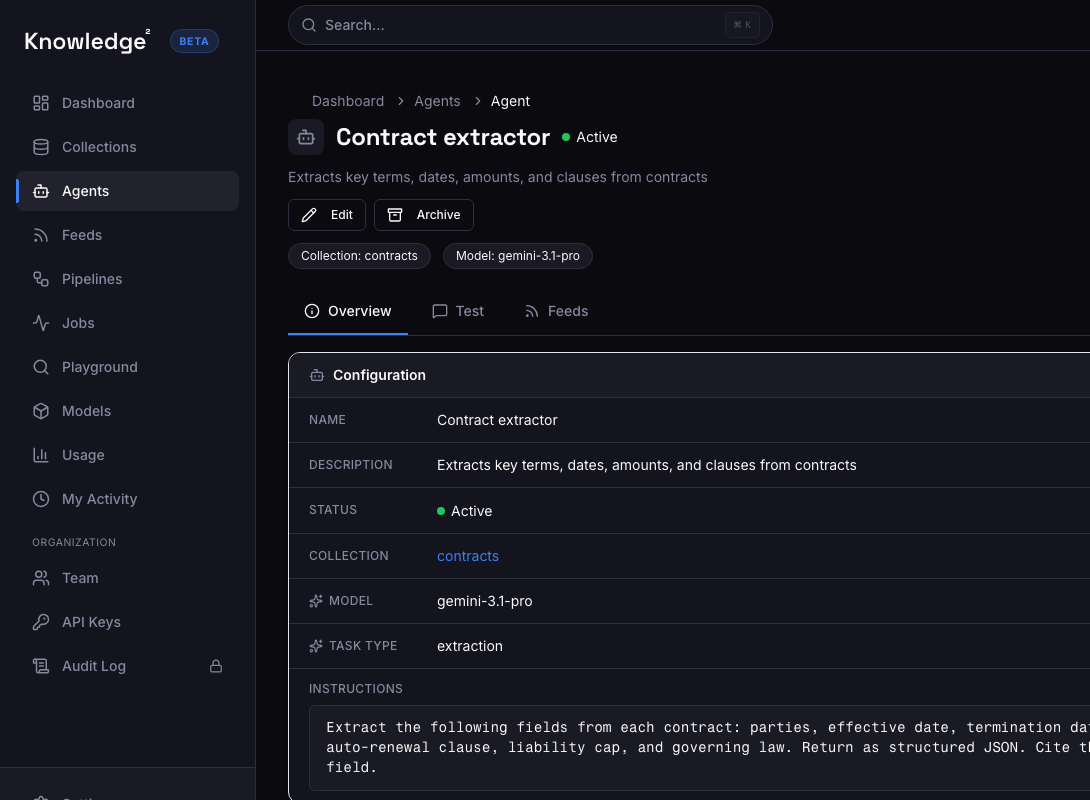
  • Configure agents via the dashboard or API. No custom ML pipelines required.
  • Chain extraction with classification: first tag, then extract, then validate
  • Outputs are versioned, auditable, and retrievable via API
Extraction agent configured to pull structured fields from contracts

What this looks like in a product

An extraction agent processes new contracts and pulls key terms

New contracts are ingested into the collection. The extraction agent runs, pulls structured fields, and publishes results with citations.

  • Key terms, dates, and amounts are extracted automatically — no manual review of every page.
  • Every extracted field cites the exact clause it came from.
  • Structured output is available via API for integration with downstream systems.

Example user experience

A legal ops manager queries extracted contract terms

The agent already processed the batch. The manager gets structured data with citations.

Question

What termination clauses are in the contracts uploaded this week?

Extracted results

Three contracts contained termination clauses: Acme Corp (30-day notice, §12.1), Beta Ltd (90-day notice with cure period, §8.3), and Gamma Inc (termination for cause only, §15.2).

  • Documents processed: 12
  • Fields extracted: 47
  • Agent: Contract extraction agent

Implemented with the Knowledge² Python SDK

Keep the implementation surface small

Python SDK example

Python
from sdk import Knowledge2k2 = Knowledge2(api_key="k2_...")# Create an extraction agentagent = k2.create_agent( name="contract_extractor", corpus_id="corp_contracts", system_prompt="Extract key terms, dates, amounts, and termination clauses from contracts. Cite each extraction.", schedule="on_ingest",)# Query extracted resultsresults = k2.chat( agent_id=agent["agent_id"], query="What termination clauses are in this week’s contracts?",)

Illustrative extraction response

JSON
{ "extractions": [ { "document": "Acme Corp MSA v2", "field": "termination_clause", "value": "30-day written notice", "citation": "§12.1: Either party may terminate with 30 days written notice..." }, { "document": "Beta Ltd Services Agreement", "field": "termination_clause", "value": "90-day notice with cure period", "citation": "§8.3: Termination requires 90 days notice and a 30-day cure period..." } ]}
  • Cited evidence on every answer
  • Tenant-scoped access controls
  • Audit logging
  • VPC / on-prem deployment
  • SOC 2 readiness

Customer results

31.8% cost reduction per turn. 43-75% less retrieval context.

~$80Kmodeled annual savingsElevataFinancial services